How to Recover a Roblox Account: Step-by-Step Guide
If you forgot your Roblox password, lost access to your account, or suspect someone has hacked it? Don’t worry, you may be able to recover your account using Roblox’s official recovery tools or by contacting Roblox Support.
This guide explains how to recover a Roblox account step by step, including what to do if you no longer have access to your email or phone number, you’ve forgotten your username, or someone has changed your account information.
Important: Account recovery depends on your ability to verify ownership. Roblox does not guarantee that every account can be recovered.
Quick Guide: Which Recovery Method Should You Use?
Choose the situation that matches your problem:
- Forgot your password: Reset it using your registered email address or phone number.
- Forgot your username: Use Roblox’s username recovery feature.
- Account hacked: Secure your devices, reset your password, and contact Roblox Support if necessary.
- Lost access to your email or phone: Contact Roblox Support and explain your situation.
- Can’t access your 2-Step Verification code: Try an available backup verification method.
- Account banned or moderated: Submit an appeal instead of using password recovery.
1. How to Recover a Roblox Account If You Forgot Your Password
If you can still access the email address or phone number linked to your Roblox account, try resetting your password first.
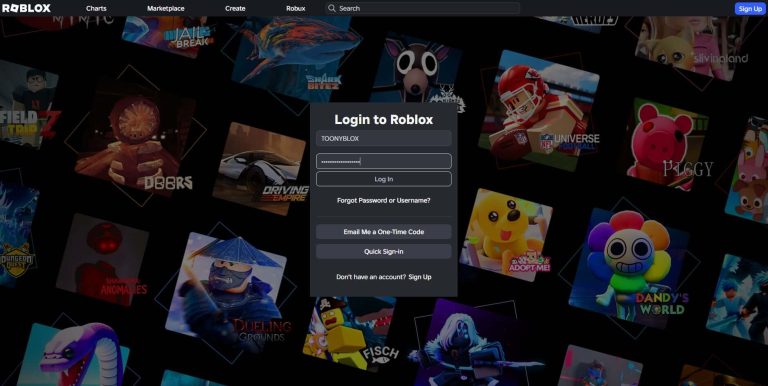
Step 1: Open the official Roblox login page
Visit Roblox.com and select the option for a forgotten password or username.
You can also open the official Roblox password recovery guide.
Step 2: Enter your registered email address
Choose the email recovery option and enter the email address associated with your Roblox account. Make sure the spelling matches the address registered to your account.
Select Submit to request a password reset email.
Step 3: Check your email inbox
Open your inbox and look for the password reset message from Roblox. If you cannot find it, check your Spam or Junk folder.
Open the message and follow the password reset instructions.
Step 4: Create a new password
Enter and confirm a new password. Use a strong, unique password you don’t use on other websites.
Step 5: Log in again
Return to Roblox and sign in using your username or another supported login method and your new password.
If the email recovery method does not work, try the phone recovery method if a phone number is linked to your account.
2. How to Recover a Roblox Account Using Your Phone Number
If you registered a phone number with your Roblox account, you may be able to reset your password without using email.
- Open the Roblox login page.
- Select the forgotten password or username option.
- Choose the Phone tab.
- Select your country code and enter your registered phone number.
- Request the verification code.
- Enter the code sent to your phone and complete the verification process.
- Follow the instructions to create a new password.
- Log in using your recovered account details.
Phone recovery is available only when the required phone number is linked to your account and the feature is supported for your account and region.
3. How to Recover a Roblox Account If You Forgot Your Username
Your display name and username are different. Your username is the account identifier shown with an @ symbol on your profile.
To recover a forgotten username:
- Visit the Roblox login page.
- Select the forgotten password or username option.
- Enter the email address associated with your account, or select phone recovery if available.
- Complete the verification steps.
- Check the recovery result for the username associated with your account.
If you cannot use your registered email or phone number, check old Roblox purchase receipts. Some receipts include the username used for the transaction.
For more information, visit Roblox’s official forgotten username guide.
4. How to Recover a Hacked Roblox Account
If someone accessed your account without permission, changed your password, or changed your registered email address, act as soon as possible.
Step 1: Secure your device
If you recently downloaded suspicious software, clicked a questionable link, or installed an unfamiliar browser extension, remove the suspicious software and run a security scan.
Do not attempt recovery on a device you believe is still compromised.
Step 2: Try resetting your password
Use the official Roblox recovery page. If your registered email or phone number still works, reset your password immediately.
If the password reset does not work because the attacker changed your account information, proceed to the next step.
Step 3: Contact Roblox Support
Visit the official Roblox Support form.
Explain that your account was compromised and describe what changed. Include your username and the approximate date you lost access.
Roblox may ask for information to verify that you own the account. Its official guidance recommends contacting support using the first email address added to the account or the billing email used for the first payment, when available.
Provide accurate information and follow the verification instructions given by Roblox Support.
Step 4: Secure your account after recovery
Once you regain access:
- Create a new, unique password.
- Secure the email account linked to Roblox.
- Enable 2-Step Verification.
- Review your account settings and active sessions.
- Check your Robux balance, inventory, and recent account activity.
Roblox does not guarantee that lost Robux or virtual items can be restored. If you lost items or currency during a compromise, contact support promptly. Roblox’s compromised-account guidance states that you must request assistance with lost inventory or currency within 30 days of the compromise.
For additional guidance, read Roblox’s official hacked-account recovery instructions.
5. How to Recover a Roblox Account Without Email or Phone Access
Losing access to your registered email address or phone number can make recovery more difficult, but you can still contact Roblox Support.
Follow these steps:
- Open the Roblox Support form.
- Enter a current email address where Roblox can contact you.
- Provide your Roblox username, if known.
- Select the category that best matches your login or account access problem.
- Explain that you no longer have access to the email address or phone number previously linked to the account.
- Provide any ownership information Roblox requests through its official support process.
Useful information may include the first email address associated with the account, an original billing email, or purchase records that help Roblox verify ownership.
Do not invent account details or send payment information unnecessarily. Follow Roblox’s instructions for any supporting evidence.
Important: Contacting support does not guarantee recovery. Roblox must be able to verify that you are the rightful account owner.
6. How to Recover a Roblox Account If You Cannot Receive a 2-Step Verification Code
If Roblox asks for a security code that you cannot access, the correct solution depends on which verification methods you previously configured.
Try these options:
- Check your registered email: If email verification is available, request a code and check your Spam or Junk folder.
- Use your backup codes: If you previously generated recovery codes, try an unused code.
- Use another available verification method: Follow the alternative options displayed on the Roblox login screen.
- Contact Roblox Support: If none of the available methods work, explain that you cannot access your verification method.
Roblox has additional recovery requirements for accounts with 2-Step Verification enabled. Depending on your account’s configuration, you may need two different verification methods to recover access.
To prepare for future problems, read the official Roblox 2-Step Verification guide.
7. How to Recover a Banned or Moderated Roblox Account
A banned or moderated account is different from an account with a forgotten password. Password recovery will not remove a moderation action.
If you believe your account was moderated incorrectly:
- Review the moderation notice and identify the reason given.
- Visit Roblox Support or follow the appeal instructions provided in the notice.
- Explain why you believe the decision should be reviewed.
- Provide accurate information and any relevant context requested.
- Submit your appeal within the deadline stated in Roblox’s moderation instructions.
Appeal eligibility and deadlines can vary. Roblox decides whether a moderation action will be changed, and submitting an appeal does not guarantee reinstatement.
8. What to Do If Roblox Account Recovery Is Not Working
If you have followed the recovery steps but still cannot log in, use this troubleshooting checklist.
| Problem | What to try |
|---|---|
| No password reset email | Check Spam or Junk, confirm the registered address, and try again. |
| Verification code not received | Confirm your phone number or email, check delivery options, and request another code if available. |
| Email or phone is no longer yours | Contact Roblox Support and explain the loss of access. |
| Password reset says no account was found | Check for spelling errors and make sure you are using the correct registered contact information. |
| Username is forgotten | Use username recovery or check old Roblox purchase receipts. |
| Account details were changed by someone else | Report the compromise to Roblox Support and provide ownership information. |
| 2-Step Verification blocks login | Try available backup methods or contact support. |
| Account is banned | Follow the official moderation appeal process. |
| Roblox will not load or the app keeps crashing | Check your connection and Roblox’s service status before retrying recovery. |
If you keep receiving errors, record the exact error message and describe what you have already tried when contacting support. This can help explain the issue clearly.
9. How to Protect Your Roblox Account After Recovery
Once you recover your account, take these steps to reduce the chance of losing access again.
- Use a unique password: Never reuse your Roblox password on other websites.
- Verify your email address: Make sure you can access the email linked to your account.
- Enable 2-Step Verification: Use an available method and keep your backup codes secure.
- Secure your email account: Use its own strong password and security features.
- Remove suspicious software: Avoid unofficial downloads and browser extensions that could steal your information.
- Never share security codes: Do not give anyone your password, verification codes, backup codes, or browser cookies.
- Avoid free Robux scams: Never enter your login information on unofficial reward or giveaway websites.
For more advice, read Roblox’s official account safety guide.
Frequently Asked Questions (FAQ)
1. Can I recover my Roblox account without an email address?
Possibly. If a phone number is linked to your account, you may be able to use phone recovery. Otherwise, contact Roblox Support and provide information that can help verify ownership. Recovery is not guaranteed.
2. Can I recover my Roblox account without a password?
Yes. If you can verify ownership using an available recovery method, you can reset your password and create a new one.
3. Can I recover a Roblox account without a username?
Try recovering your username through your registered email address or phone number. You can also check old purchase receipts for account details.
4. What if a hacker changed my email and password?
Contact Roblox Support as soon as possible. Explain that your account was compromised and provide the original account information requested for ownership verification.
5. Can Roblox Support return my stolen Robux or items?
Not necessarily. Roblox does not guarantee restoration of lost virtual items or currency. Contact support promptly if your account was compromised and you lost items or Robux.
6. Can I recover a Roblox account if I lost my old phone number?
You may still be able to recover it using your registered email or another supported verification method. If those options are unavailable, contact Roblox Support.
7. Why am I not receiving a Roblox password reset email?
Check your Spam or Junk folder, verify that you entered the correct email address, and make sure it is the address registered to the account. If the problem continues, contact Roblox Support.
8. How long does Roblox account recovery take?
There is no guaranteed recovery time. Simple password resets may be completed quickly, while cases that require ownership verification or support review can take longer.
9. Can I recover a permanently banned Roblox account?
You can submit an appeal if eligible, but reinstatement is not guaranteed. Follow the appeal instructions and deadline in the moderation notice.
10. Can I trust websites that promise to recover my Roblox account?
Be cautious. Use Roblox’s official recovery tools and support channels. Avoid websites or individuals asking for your password, browser cookies, verification codes, or payment in exchange for guaranteed recovery.
ToonyBlox Final Thoughts
Recovering a Roblox account starts with identifying the problem and using the appropriate official recovery method. If you forgot your password, try email or phone recovery first. If your account was hacked, your contact information changed, or your verification methods no longer work, contact Roblox Support and follow its ownership verification process.
After regaining access, secure your account immediately and keep your recovery options up to date. Never trust anyone who promises guaranteed account recovery in exchange for your password or security codes.
ToonyBlox reminder: Always use official Roblox recovery and support pages to protect your account, Robux, and virtual items.
About the Author

Tony Brooks
Administrator
Hi! I'm Tony Brooks, a passionate video game player who has loved exploring, expanding, and sharing my gaming knowledge with everyone for the past decade. At first, playing Roblox games was just a pastime hobby for me until I realized how many wonderful ideas this platform has to offer. That's why I created this website to help other players win and bring their normal hobby or gameplay to the next level. Join me as TOONYBLOX, and together we will explore the hidden gems and precious moments as we dive into the world of Roblox for the next chapters of our gaming lives.